

Start a WhatsApp conversation proactively
Proactively start a WhatsApp conversation with a specific user.
You will need:
WhatsApp only allows proactively sending messages if they’re created from a template. You can create a template from your WhatsApp Manager dashboard.
After WhatsApp reviews and approves your template, follow the steps in this guide.
Setup
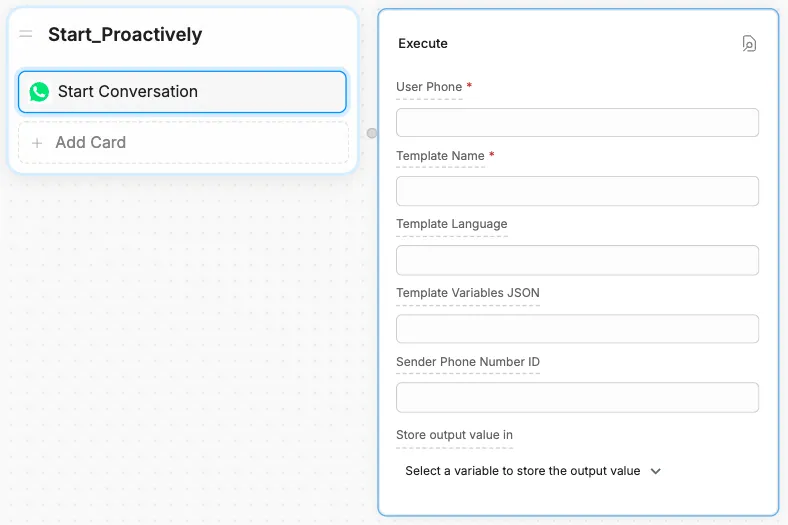
Fill in the required fields
Fill in the fields:
User Phone
User Phone
The user’s phone number, including the country code.
Example: +1 123 456 7890
Template Name
Template Name
The name of your WhatsApp message template.
Example: proactive_message
Template Language (Optional)
Template Language (Optional)
The language code for your WhatsApp message template. Defaults to en_US.
Although this field is optional, an error will occur if you leave the field blank and your message template’s language isn’t English (US).
If the language you selected for your template has a country qualifier, then you need to specify a value in the language_COUNTRY format, where:
languageis the 2-letter lowercase ISO language codeCOUNTRYis the 2-letter uppercase ISO country code
For example, if you selected the English (UK) option, enter en_GB.
If the language you selected for your template has no country qualifier, just specify the 2-letter lowercase ISO language code.
For example, if you selected the French option, enter fr.
Template Variables JSON (Optional)
Template Variables JSON (Optional)
A JSON array containing the values for your message template’s variables.
WhatsApp uses numbers to name variables within message templates. For example, if you have two variables, you need to name them {{1}} and {{2}}
When you enter your JSON array in Botpress, you can order the entries based on how you want WhatsApp to assign the values:
["First value", "Second value"]With the above array:
"First value"will be assigned to{{1}}"Second value"will be assigned to{{2}}.
Sender Phone Number ID (Optional)
Sender Phone Number ID (Optional)
The WhatsApp Phone Number ID that will message your user. Defaults to the Phone Number ID you used to configure your integration.
To use a different WhatsApp Phone Number ID, you need to have added it via your Meta developer dashboard.
Access the Conversation ID
You can access the proactively started conversation’s ID in Studio by storing the Start Conversation Card’s output in a variable. Just select a variable to store the value in:

The output value of this action will be an object with the following structure:
{
  conversationId: 'xxxxxxxxxxxxxxxxxxxxx'
}
Create the conversation from code
You can also call actions.whatsapp.startConversation in an Execute Code Card to start a conversation:
actions.whatsapp.startConversation({
  conversation: {
    userPhone: '+1 123 456 7890',
    templateName: 'test_message',
    templateLanguage: 'en',
    templateVariablesJson: JSON.stringify(['First value', 'Second value']),
  },
})